


To deposit at an online casino, open the cashier, select an available payment method, check its limits and charges, choose whether to activate a bonus, and approve the payment with your provider. A successful bank authorisation and a credited casino balance are separate events: check both before trying another transaction.
The screens below show how Spinimax, MoneyMoon and VikingLuck organise payment choices. They explain what to read before paying, including differences between a wallet, a card route and a country-specific payment list. Winlion adds an example of a cashier that presents one available method rather than a full grid. Availability still depends on your location and account currency.
What Should You Check Before You Deposit at an Online Casino?
Before you deposit at an online casino, check that the operator serves your country, that you meet the local age requirement, and that the payment method belongs to you. Read the withdrawal conditions before funding the account; accepting a deposit does not mean the same route can receive a payout.
Choose a maximum amount you are comfortable spending before opening the cashier. Keep that amount separate from the balance in your bank or wallet. If the minimum for a promotion exceeds your planned payment, declining the promotion is an option; its advertised reward is not a reason to increase your budget.
| Check | Where to look | What it prevents |
|---|---|---|
| Account currency | Account settings and the amount form | Unexpected conversion between the bank, wallet and casino |
| Method minimum | The selected payment tile or form | Applying a general minimum to a different method |
| Bonus selection | The promotion panel inside the cashier | Starting unwanted wagering or sticky-bonus conditions |
| Withdrawal route | The separate withdrawal tab | Assuming a prepaid deposit can receive winnings |
| Spending controls | Account limits and provider settings | Funding beyond the limit you chose |
Which Casino Cashiers Illustrate Different Deposit Routes?
Spinimax, MoneyMoon, VikingLuck and Winlion illustrate four different ways to deposit at an online casino. Use the examples to identify the controls in front of you, rather than treating a screenshot as a universal list for every account.
| Casino | Practical example | Before you continue | Visit casino | Casino review |
|---|---|---|---|---|
 Spinimax | EUR cashier: Revolut €10–€5,000; MiFinity €10–€2,500 | The welcome offer has a separate qualifying minimum. | Visit casino ↗ | Read review → |
 MoneyMoon | EUR payment grid: cards, Revolut-branded cards, MiFinity and crypto | Revolut appears within the card route; the country view matters. | Visit casino ↗ | Read review → |
 VikingLuck | Iceland/EUR view: Paysafecard €10–€1,000; MiFinity €10–€2,500 | Choose the correct country and currency before reading the range. | Visit casino ↗ | Read review → |
 Winlion | Interac tile in the displayed cashier | Check the currency on the amount form; a $ symbol alone is insufficient. | Visit casino ↗ | Read review → |
These are interface and payment examples, not a ranking by safety or a promise of bonus eligibility. The full reviews explain the wider terms, including withdrawal restrictions. Read them before choosing where to fund an account.
How Do You Deposit at an Online Casino Step by Step?
To deposit at an online casino in the right order, settle the account and bonus choices before approving the transfer. The final check is the transaction record, not a promotional pop-up.
- Open your own account and cashier. Sign in through the correct casino address, then choose Deposit or Cashier. Complete any required identity checks first.
- Read the available payment choices. Select the actual method, not merely a familiar logo in the footer. Check its account currency, minimum and maximum.
- Choose the bonus deliberately. Open its terms, check the qualifying amount and payment exclusions, and opt out if you prefer a cash-only balance.
- Enter an affordable amount. Compare the amount leaving your provider with the amount credited, including conversion and any processing charge.
- Approve with your payment provider. Complete the bank, wallet or card authentication in its genuine window. Never give a support agent your security code.
- Check the result once. Return to the casino, read the transaction status and confirm the balance. Save the reference before closing the page.
If a payment window closes without a clear result, do not immediately repeat the transfer. A pending bank authorisation may exist even when the casino has not yet posted the funds. The declined casino deposit guide explains how to distinguish a failed attempt from a payment that needs tracing.
How Does the Spinimax Deposit Screen Work?
The Spinimax deposit screen puts the active welcome offer above the payment methods, so check that choice before selecting Revolut, MiFinity or CASHlib. The EUR view below displays an OPT-OUT control and a separate minimum and maximum on each tile.
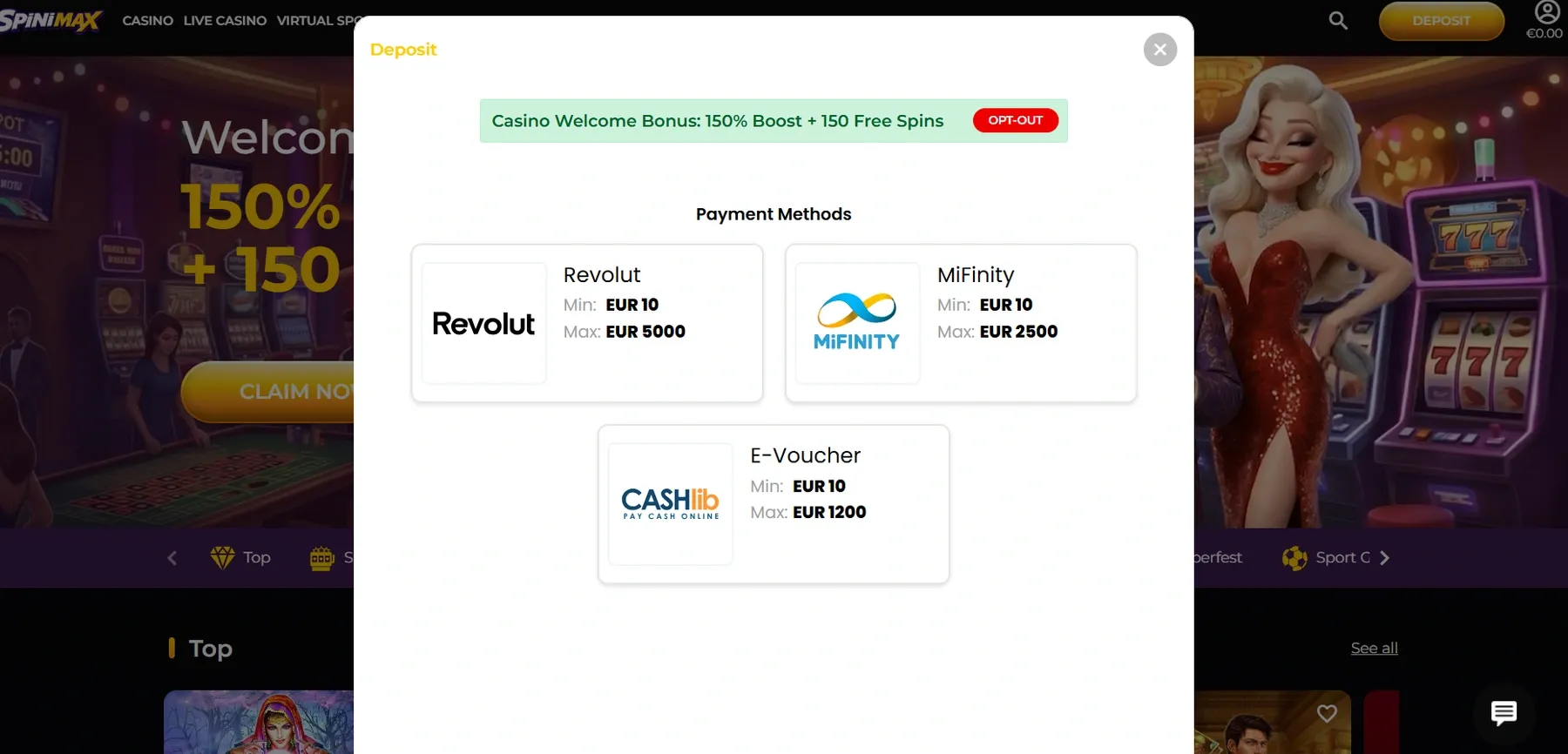
For Revolut, this screen lists €10–€5,000; for MiFinity it lists €10–€2,500; CASHlib has a different upper limit. The €10 cashier minimum is not the same as the €20 entry for the welcome offer. A payment can satisfy the method while failing to qualify for a promotion.
- Read the green promotion strip and open the welcome conditions before choosing whether to keep the offer.
- Select the payment tile available to your account and compare its range with your intended amount.
- Check the next amount and provider-confirmation screens, then approve only the agreed amount.
This is a useful distinction whenever you deposit at an online casino with a welcome promotion. A large headline percentage does not change the method’s actual quote or guarantee that every deposit receives the headline package.
How Does MoneyMoon Separate Cards, Wallets and Crypto?
MoneyMoon separates its deposit choices into tiles under the Deposit tab, with Withdraw shown as another tab. In the EUR screen below, Visa, Mastercard, Maestro, Revolut-branded cards and MiFinity show a €10 minimum, while crypto opens its own selection.
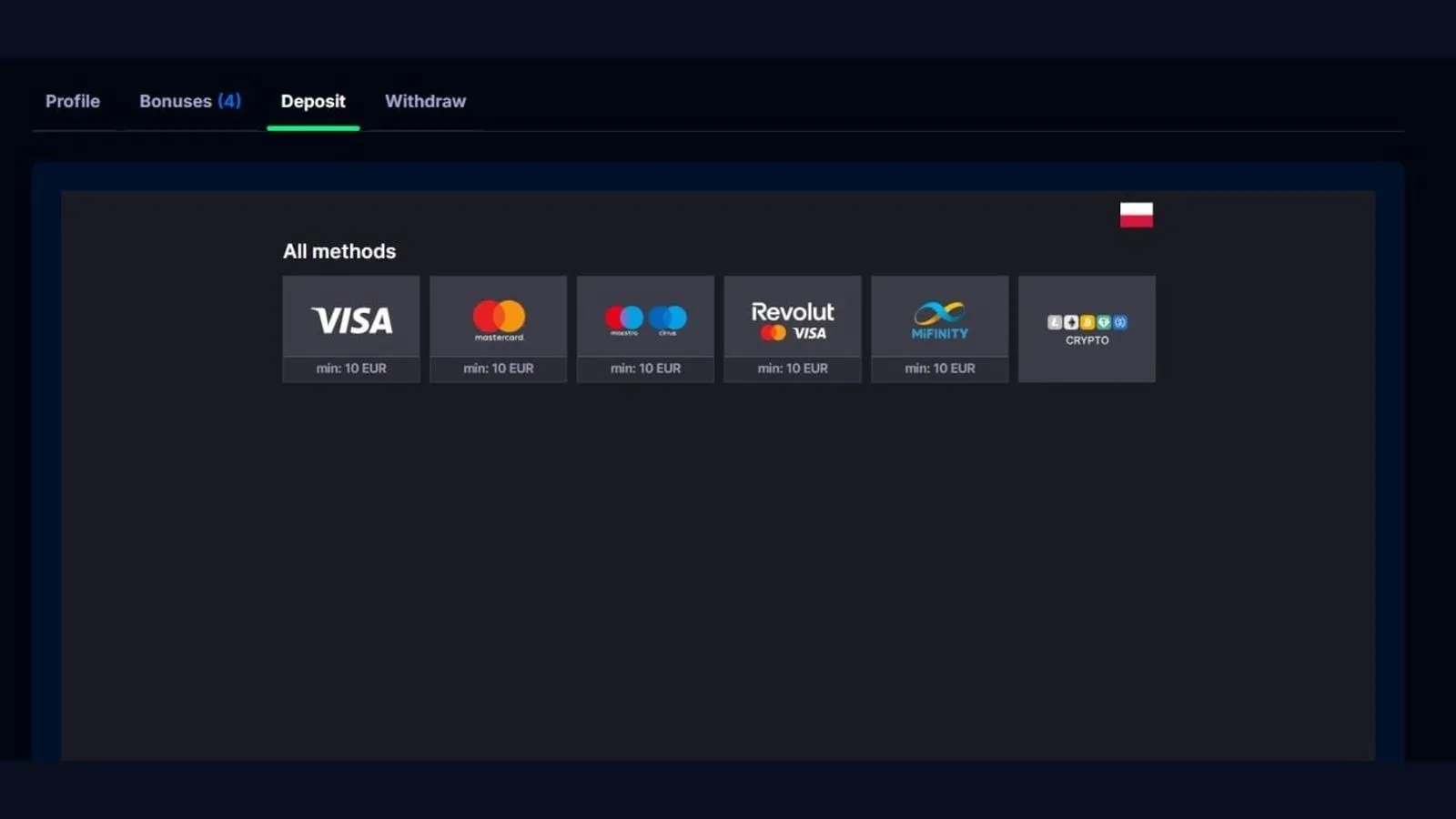
Read the branding literally: Revolut beside Visa and Mastercard represents a card route here. It should not be treated as proof of a separate Revolut bank integration. The country flag and account currency also matter; the same brand may display other methods to a different eligible account.
- Select Deposit rather than Withdraw and confirm the country and currency view.
- For a card payment, choose the matching card tile; for MiFinity, choose the wallet tile instead.
- Read the selected form’s limits and currency before continuing to the provider’s authorisation.
If you intend to deposit at an online casino using crypto, stop at the network selection and compare the full network name with your sending wallet. A token name alone does not identify the correct blockchain. Network fees and any conversion into the casino balance must fit within your planned spend.
How Do VikingLuck and Winlion Change the Payment Choice?
VikingLuck exposes country and currency selectors above its payment list, while the Winlion screen below displays an Interac tile in a compact instant-deposit window. These layouts make location and currency checks essential before entering an amount.
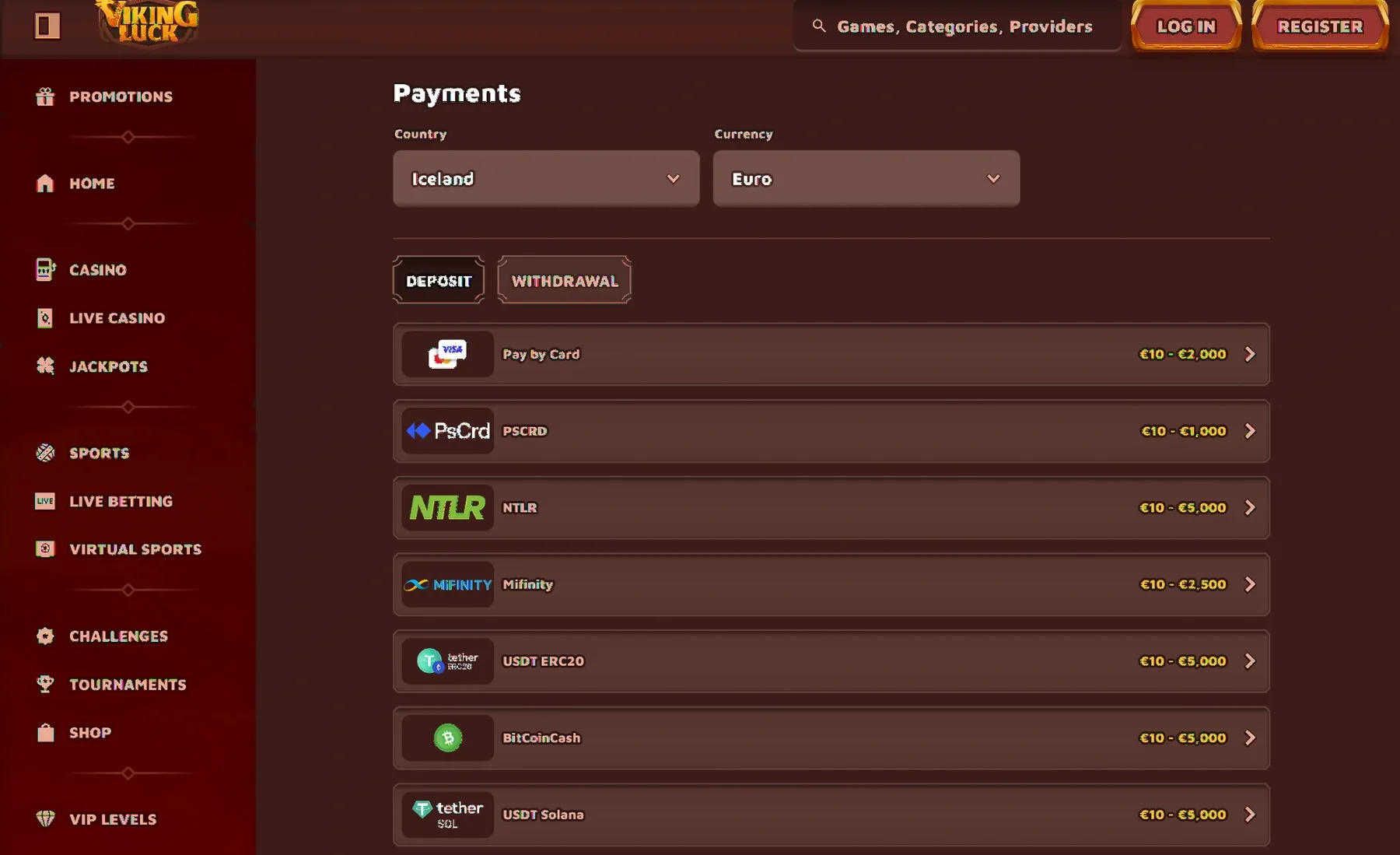
In VikingLuck’s Iceland/EUR example, Paysafecard is listed at €10–€1,000 and MiFinity at €10–€2,500. Those are limits for that view. Changing country or currency can change the list, so do not copy a quote from one setting into another.
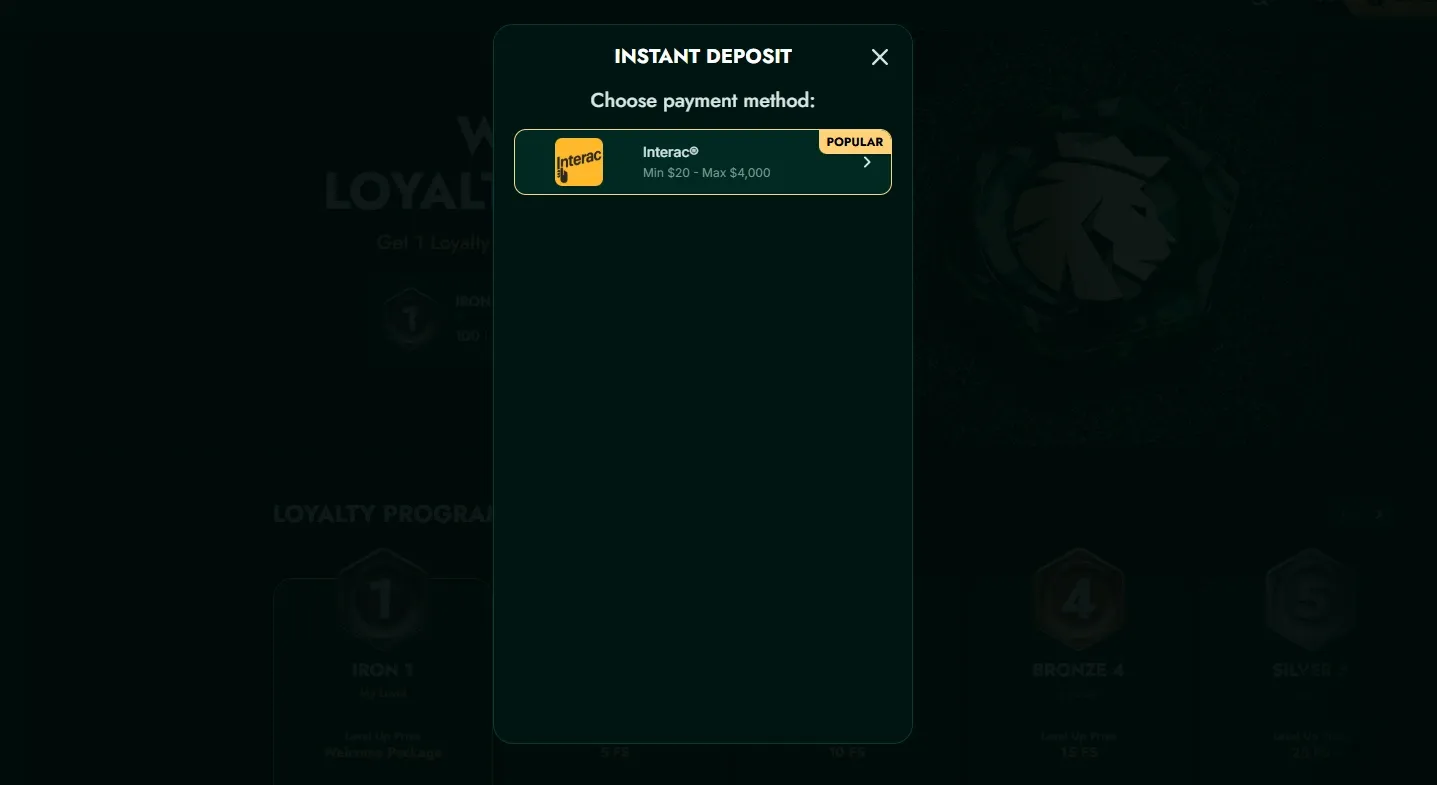
Winlion’s tile uses a dollar symbol. The amount form determines the actual processing currency; the previously examined form used USD, so the tile must not be relabelled as a CAD quote. When you deposit at an online casino, check the currency code and any conversion before approving the bank request.
What Happens After You Approve the Payment?
After you deposit at an online casino, the transaction should show a clear status and the appropriate cash or promotional balance. A payment receipt confirms the transfer details; the bonus area confirms whether a chosen reward actually activated.
| What you see | What to check next | What to avoid |
|---|---|---|
| Completed and balance credited | Amount, currency and selected bonus status | Assuming the whole package arrived after one payment |
| Pending at the provider | Transaction ID and casino history | Sending a second payment to force a result |
| Declined without a debit | Authentication result, limits and provider message | Bypassing a gambling block with another route |
| Debited but no casino credit | Provider reference and casino support case | Sharing full card details or security codes |
Keep a receipt containing the amount, date, currency and reference. Send only the details support needs, with unrelated personal information concealed where appropriate. If the issue is unresolved, ask which side is investigating and when you should expect an update. Do not make another deposit at an online casino to unlock a previous payment or a withdrawal.
SpinimaxFrequently Asked Questions
Can I deposit at an online casino without taking a bonus?
Usually a cash-only option or an opt-out is available, but check the actual cashier. Spinimax’s displayed screen has an OPT-OUT control. Confirm that no unwanted promotion is active before you pay.
Why does a €10 payment not always activate the welcome offer?
A method minimum and a promotional minimum are separate rules. Spinimax’s displayed EUR cashier starts at €10 for several methods, while the welcome offer requires €20.
Is a casino footer logo enough to confirm a payment method?
No. Open the cashier for your country and currency. A footer is broader branding and may include methods unavailable to your account or a card route rather than a direct wallet integration.
Should I retry immediately if no balance appears?
Check the provider and casino transaction history first. A pending authorisation can remain even when the casino shows no completed credit. Save the reference and ask for a trace before retrying.
Can someone else fund my account?
Use payment methods in your own name. Third-party funding can fail ownership checks and complicate a later withdrawal, even when the initial payment appears to complete.
Explore Game Reviews and Free Demos
Open a game review to read its rules and launch its virtual-credit demo.






 LinkedIn