

Apple Pay vs Google Pay at online casinos comes down to device support, the accepted card and each operator’s payment terms. Winspin lists both at €20–€750 with a 0% casino deposit fee. SpinBetter lists Google Pay/Mastercard from €5; that separate quote does not establish Apple Pay support.
We may earn a commission through links on this page. Regional restrictions and offer conditions apply. EUR examples are not fixed USD quotes or a list of US state-licensed offers.
For Apple Pay vs Google Pay, compare the same currency and transaction direction. Matching wallet deposit limits do not determine bonus eligibility, issuer charges or where winnings can be paid.
Explore the comparison ↓Apple Pay vs Google Pay: Which Casinos List Each Wallet?
Winspin lists both Apple Pay and Google Pay; SpinBetter lists Google Pay/Mastercard, while Winlion and Slottica advertise Apple Pay. Andromeda lists both for eligible markets. The complete comparison below shows which wallet is listed at each casino and where the current quote needs checking.
Compare the payment details and account conditions, then open the casino review for the full terms.
| Casino | Payment details | What to check | Casino review |
|---|---|---|---|
 Winspin | Apple Pay: €20–€750; Google Pay: €20–€750 | Confirm the available wallet, supported card and current quote | Read review → |
 SpinBetter | Apple Pay: Check wallet availability in your account; Google Pay: Google Pay/Mastercard: €5–€1,000 | Confirm the available wallet, supported card and current quote | Read review → |
 Winlion | Apple Pay: Advertised; check the current quote; Google Pay: Check wallet availability in your account | Confirm the available wallet, supported card and current quote | Read review → |
 Slottica | Apple Pay: Displayed; cashier-specific limits; Google Pay: Check wallet availability in your account | Confirm the available wallet, supported card and current quote | Read review → |
 Andromeda | Apple Pay: Listed for eligible markets; cashier quote required; Google Pay: Listed for eligible markets; cashier quote required | Confirm the available wallet, supported card and current quote | Read review → |
How Do Apple Pay and Google Pay Casino Deposits Compare?
Compare the two mobile wallets using the same casino, currency and transaction type. Winspin lists both Apple Pay and Google Pay at €20–€750 with a 0% casino deposit fee.
The table below separates the common quote from the account-level checks that still matter.
| Question | Apple Pay | Google Pay |
|---|---|---|
| Winspin public deposit range | €20–€750 | €20–€750 |
| Winspin published casino deposit fee | 0% | 0% |
| Device and card setup | Supported Apple Pay device and card | Supported Google Pay setup and card |
| Casino bonus eligibility | Check the specific promotion | Check the specific promotion |
| Withdrawal compatibility | Verify separately | Verify separately |
Published deposit fees do not describe every card-issuer or currency-conversion cost. Neither wallet removes the casino’s regional restrictions.
WinspinWhich Casinos Give a Useful Wallet Comparison?
Winspin gives a direct two-wallet comparison, while SpinBetter’s cashier adds a different Google Pay price point. These are payment-specific examples rather than a claim that every casino supports both services.
Winspin’s official payment table lists Apple Pay and Google Pay as separate rows. Comparing those rows keeps the operator and currency consistent.
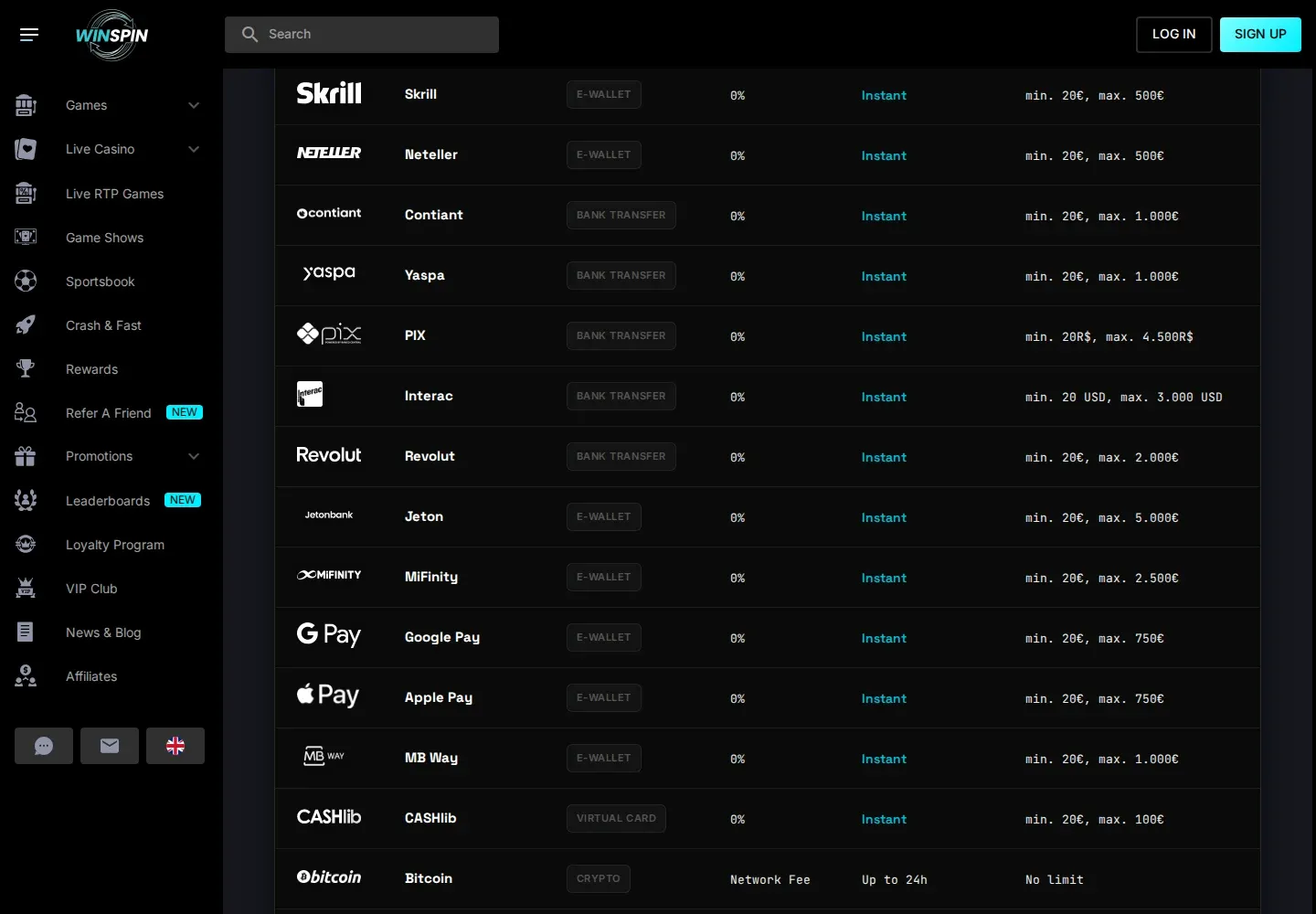
SpinBetter’s Google Pay/Mastercard route starts at €5 and reaches €1,000. Its ordinary Visa/Mastercard row starts at €10, demonstrating that even card-related options can have different limits.
SpinBetterSpinBetter’s menu provides a second operator example. Its Google Pay/Mastercard route has its own amount range, separate from ordinary cards and e-wallet services.
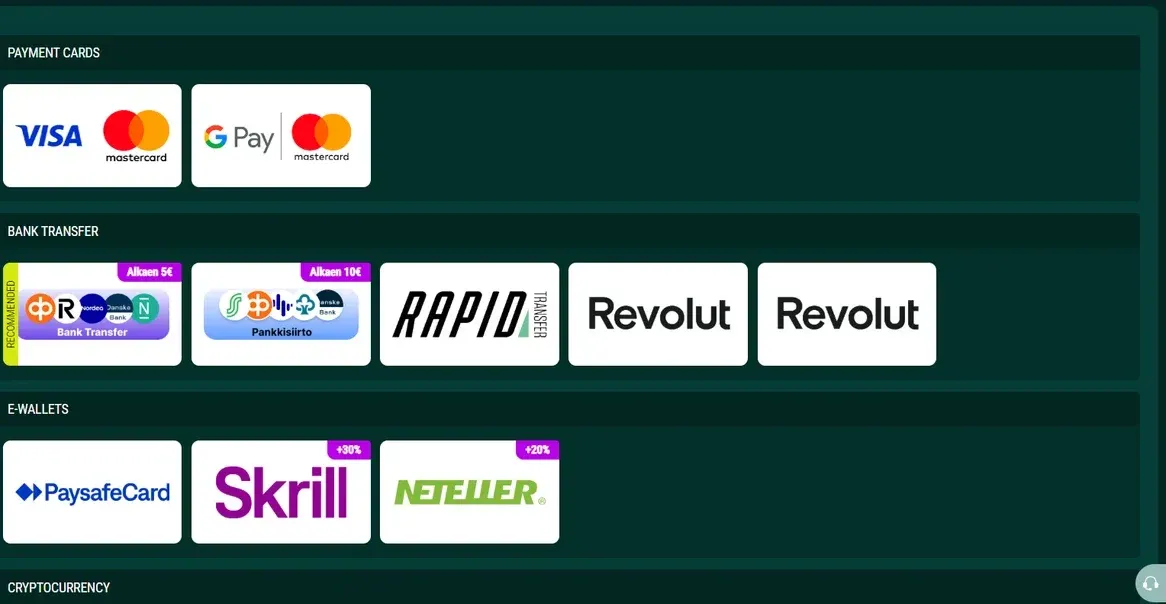
Apple Pay and Google Pay availability differs by casino. Winspin lists both, SpinBetter lists Google Pay/Mastercard, and Winlion and Slottica advertise Apple Pay with account-specific limits.
Choose the available wallet and supported card rather than assuming the casino accepts both services. A missing listing is not a reason to infer a matching quote.
Which Wallet Should You Use on Your Device?
Apple Pay vs Google Pay starts with your device, supported card and the casino checkout. Use the wallet that can authorise your own card within the limits you planned.
Check the actual checkout rather than relying on the phone operating system alone. The browser, card issuer and merchant configuration can affect which button appears. A missing wallet option does not mean the casino account needs a larger deposit.
Apple’s official acceptance guidance notes the importance of both a supported issuer and the merchant accepting the card network. Google’s payment-method guidance should be checked for the corresponding setup.
At Andromeda, Apple Pay and Google Pay are listed for eligible markets, but a method may be absent from a particular country or device view. Check the option offered to your actual account; do not apply another route’s limits.
How Do Apple Pay and Google Pay Casino Checkouts Work?
Apple Pay and Google Pay casino checkouts both require a supported underlying card, an eligible merchant integration and approval of the actual payment. The wallet button changes the checkout experience, while the card and casino still determine whether the transaction can proceed.
Start by selecting the amount and checking the wallet-specific range. Open the wallet confirmation, confirm the merchant, card and currency, and authorise the intended debit. Return to the casino and compare the confirmation with the available cash balance.
A device recognising your face, fingerprint or passcode confirms an authentication step; it does not guarantee casino credit. If the casino reports a failure, check whether the card shows a pending reservation or completed payment before trying again.
Apple Pay vs Google Pay: Which Costs Less?
Apple Pay vs Google Pay has no universal fee winner: the operator, card issuer and conversion arrangement determine the final cost. Winspin gives both wallets the same EUR range and casino fee.
That like-for-like quote removes one difference between the two buttons, but it does not cover every issuer or currency charge. Compare the card selected in each wallet, the charged currency and the final debit rather than assuming that the operating system determines the price.
Using two different cards would change the comparison. A fee or decline caused by one issuer is not necessarily a feature of Apple Pay or Google Pay. Keep the operator, account currency and intended amount consistent when comparing the options.
Apple Pay vs Google Pay: Privacy and Account Checks
Apple Pay and Google Pay do not make casino payments anonymous or remove identity checks. They provide supported card checkout arrangements, while the casino still holds account and transaction information and can request ownership documents.
Use your own card and account details. If the casino asks which underlying card funded the payment, provide the specific evidence it requests through the secure upload channel. Ask support how it identifies a wallet-funded transaction if the details displayed in the wallet differ from the information expected on a standard card form.
Payment authentication also does not establish a gambling licence or settle a dispute about bonus terms. Assess the casino’s account, withdrawal and regulatory conditions separately from the convenience of either wallet.
Does Apple Pay or Google Pay Give Better Casino Bonuses?
Neither mobile wallet determines which welcome bonus you receive. The operator sets the qualifying deposit, excluded methods, eligible countries and activation sequence.
At Winspin, the first-stage minimum is €20 and the bonus is sticky. The matching wallet minimums do not remove the maximum stake, cashout ceiling or other bonus conditions. At SpinBetter, a €5 Google Pay payment falls below the €10 first welcome entry.
This makes the cashier minimum and the bonus minimum two different comparisons. Choose the amount independently of the promotional headline, then decide whether the selected offer is appropriate.
Calculate the Bonus Wagering Before You Opt In

For Apple Pay vs Google Pay bonuses, the accepted payment and offer terms come before the calculation. Winspin’s sticky 0× match and SpinBetter’s 35× bonus requirement are different structures. The tool starts with a hypothetical €20 deposit, 100% match and 35× bonus-only example.
Enter bonus terms
Example values are illustrative and do not represent a live casino offer.
Your wagering breakdown
Mathematical requirements, not a prediction that you will meet them.
How the calculation works
Game contribution comparison
| Contribution | Gross wagers needed | Illustrative expected loss |
|---|
Wagering progress tracker
Record your own wager totals; Gamzzz does not connect to casino accounts. Entries stay in this browser only. Wagering entries are bound to the bonus terms saved when tracking began. Changing those terms pauses progress until you restore them or clear the log.
Progress so far
Manual activity log
| Entry | Gross wagered | Contribution | Eligible | Action |
|---|---|---|---|---|
| No entries yet. | ||||
Explore the bonus math
Compare hypothetical wagering multipliers. This table uses your current bonus size and wagering base; no casino balance or bankroll is simulated.
| Multiplier | 100% game contribution | 50% contribution | 20% contribution |
|---|
Illustrative RTP cost scenarios
No simulated payouts or completion probabilities. These figures simply calculate the mathematical expectation for a fixed amount wagered.
Educational session simulator
A synthetic model demonstrates how different payout frequencies produce different outcomes with the same theoretical RTP. It is NOT a real slot, a wagering-clearance simulator or a prediction.
One bet per round at the entered stake. Synthetic positive payout is RTP ÷ its probability, with all other payouts zero. 200 sessions; no bankroll or rules enforcement.
Bonus terms trainer
Five short questions about wagering calculations and common misconceptions.
QUESTION 1 / 5
Set the inputs to the promotion you are considering. A €20 bonus at 35× requires €700 in qualifying stakes; a 35× requirement on a €20 deposit plus €20 bonus requires €1,400. These figures describe betting volume, not a guaranteed return or the amount you will lose. Check payment eligibility, maximum stakes, expiry and cashout restrictions separately.
Apple Pay vs Google Pay for Casino Withdrawals
For Apple Pay vs Google Pay withdrawals, the supported payout destination matters more than the deposit button. Ask whether the operator returns funds to the underlying card or uses another approved route.
Ask whether the payment returns to the underlying card, uses a named wallet route or needs an approved alternative. Also check the withdrawal minimum and whether a previous deposit is required. General “instant wallet” wording should not replace those answers.
Withdrawal times depend on approval, verification and settlement. For small-balance conditions, read the withdrawal-minimum guide; for an unavailable or declined checkout, use payment troubleshooting.
What Should You Do if One Wallet Is Declined?
If Apple Pay or Google Pay is declined, establish the card and casino transaction status before switching wallets or submitting another payment. A second checkout can create a duplicate instruction without resolving the first one.
If the issuer rejected the transaction, read its reason and contact it for clarification. If money is pending, ask about the authorisation state. If a completed debit has no casino credit, provide the casino with the safe payment reference, time, amount and currency.
A different wallet does not override a gambling block, issuer restriction or self-exclusion. Resolve the existing status and respect those controls. The declined-deposit guide separates the possible states and explains which support team to contact.
When Should You Choose Apple Pay or Google Pay?
Choose Apple Pay or Google Pay when that wallet is available on your device, supports your own card and has an eligible casino checkout with acceptable full payment terms. There is no benefit in selecting a wallet button the account cannot actually use.
At Winspin, the matching deposit range means the payout route and selected promotion deserve attention before the wallet choice. SpinBetter’s Google Pay/Mastercard route provides a €5 entry with a €1,000 maximum; it does not establish Apple Pay support there or qualification for the €10 first welcome offer.
If the method is available but the withdrawal arrangement is unclear, clarify that before depositing. A familiar wallet can simplify a checkout without making the whole casino account more suitable for your needs.
Apple Pay vs Google Pay: Which Should You Choose?
The Apple Pay vs Google Pay choice should follow the supported setup and full payment terms. At Winspin, matching deposit limits leave the promotion and payout rules as the more useful comparison.
SpinBetter’s Google Pay example is relevant if that route is available to you and its wider review assessment is acceptable. The Apple Pay guide goes into device and card checks in more detail.
Explore Slot Reviews and Free Demos
Open a full game review, learn its features and try the separate demo with virtual credits. No payment is needed to use these demos.




Payment Methods: Your Questions Answered
The supported device and card determine which wallet you can use. The operator sets the payment limits, bonus terms and payout route.
Does Apple Pay vs Google Pay change Winspin’s deposit minimum?
No. Winspin lists both wallets at €20–€750 with a 0% casino deposit fee. Your card and account still need to support the transaction.
Does Google Pay guarantee the same limits as Apple Pay everywhere?
No. The matching Winspin quote is one operator’s example, not a universal rule.
Does SpinBetter list both mobile wallets?
SpinBetter lists Google Pay/Mastercard from €5 to €1,000. That quote does not establish Apple Pay availability; check the actual wallet menu.
Can either wallet bypass a card issuer’s gambling restriction?
Do not use a wallet as a workaround for issuer restrictions, gambling blocks or self-exclusion.
Are these wallets a replacement for KYC?
No. The casino can still require identity and payment-ownership verification.
Does the same card always have the same casino limits in both wallets?
Not necessarily. The casino’s integration and the selected payment row can have different conditions.
Does face or fingerprint authentication mean the casino received the money?
No. Check the card transaction status and the casino balance separately.
Should I switch wallets while a payment is pending?
First establish the existing transaction status; another payment can duplicate the instruction.
Read Next
Choose the next guide according to the condition you want to investigate.